REVEALED: Our Asset Allocation During Financial Independence


A reader writes:

Hey Nords, what asset allocation do you maintain now that you’re financially independent and retired?

I retired from the military over 13 years ago, and today we still have pretty much the same high-equity asset allocation that we had when we reached financial independence. Our fund choices are more complicated and expensive than they need to be, so that might evolve over the next two decades. But before I distract you with tickers, let me talk about designing an asset allocation.


Different Asset Allocations

There are many different ways to invest for financial independence and your retirement, and almost all of them work. Military service is reliable employment, so while you’re in uniform you could choose an investment portfolio that’s high in equities. In an ideal world, we’d all have passive index funds with some of the world’s lowest expense ratios. We could all maximize our contributions to the Thrift Savings Plan (C, S, and I funds) and we could all put our Roth IRA contributions in a total stock market fund. In addition to equities, you could invest in real estate with REITs or rental properties.
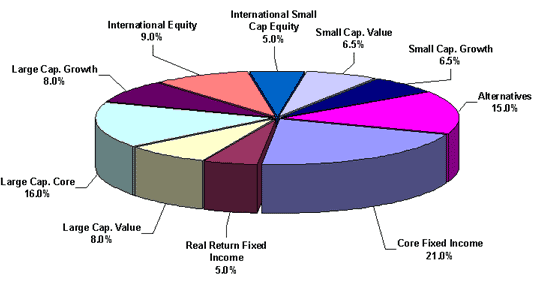
Image of a pie chart for asset allocation with 10 different asset classes | The-Military-Guide.com

Not ours– that’s way too complicated.

However, we’re all human beings, not just heartless logic machines. Behavioral finance is a very important aspect of investing with our emotions. It shows how we feel about money, how we deal with risk, how comfortably we sleep at night, and why we panic when the stock market drops.

Education and experience are also part of asset allocation. The more you learn, the more comfortable you can be with volatility or bear markets. When you research and create your personal plan, you’re more likely to stick to the details until you reach your goal.

Even Warren Buffett spends hours each day reading newspapers and financial reports to understand the global economy, different industries, and dozens of companies. Today he sleeps extremely well at night, but when he was starting out in the 1950s he found that research and thinking helped him form his own conclusions instead of getting swept along with a crowd. I’ll never be Warren Buffett but I enjoy reading about economics, the markets, and investing– for maybe an hour or two a week. I’ve developed the confidence to stay invested during recessions and bear markets.

When my spouse and I started investing in the 1980s, we made plenty of mistakes. We invested in actively-managed funds with sales charges of 2% and annual expense ratios over 1%. We chased hot managers and performance. We timed the market. We picked stocks. We reacted emotionally to volatility and recessions. Our only “plan” was to save as much as we could for as long as possible. Our high savings rate overcame all of our mistakes.

Today there’s an overwhelming amount of investing information, and that can lead to paralysis by analysis. It takes most military families about 20 years to save for financial independence, and there will be lots of changes during those decades. The best approach is learning a little about asset allocation now so that you can start investing, and then keep reading about it. While your wealth grows you’ll find your comfort zone and, best of all, you’ll sleep well at night. The more you learn, the less likely you are to panic.

As you read the rest of this post, think about how you’d design your own asset allocation and build your own investment portfolio. There are millions of different choices for your financial independence. The key is to develop your very own asset allocation plan, not one handed to you by a financial advisor (or a blogger!). You have to have a system that you believe in (because you built it) and that you’ll follow (because you made your rules).


Our Situation

My military pension handles most of our expenses, and we (finally) have a little cash flow from our rental property. The rest of our spending is covered by our investment portfolio interest and dividends plus the 4% Safe Withdrawal Rate.

We sleep comfortably at night with our asset allocation because much of our income is annuitized and adjusted for inflation. Your financial independence should also include some annuity income, even if it’s “just” Social Security. An annuity is only longevity insurance and it has nothing to do with the 4% SWR or success rates. An annuity is failure protection. If your investment portfolio is completely wiped out by an economic depression or some unforeseen catastrophe, you’ll still have a bare-bones income every month.

When my spouse and I began saving for financial independence, we were clueless about asset allocation. We started with balanced funds and equity-income funds. As we learned more about asset allocation and read Milevsky’s “Are You A Stock Or A Bond?” book, we realized that our reliable military paychecks meant that we could invest much more aggressively. We eventually invested in a 100% equity portfolio.

As I approached my retirement, we decided to keep a high-equity portfolio. A U.S. military pension is the world’s best annuity and the equivalent of the income from a portfolio of inflation-adjusted bonds. With so much bond-like income from a pension, we decided that the rest of our investments should stay in stocks.

However, we also knew that a high-equity portfolio is very volatile. One reason for asset allocations to both stocks and bonds is that the overall portfolio has much lower volatility. If I had left active duty for the Reserves (with maybe a civilian bridge career) then we might have reduced our equity allocation and added a bond fund to our portfolio. Since I stayed on active duty all the way to 20 years and a military retirement, we also stayed with a 100% equity portfolio.

When I retired in 2002, though, my pension did not cover all of our expenses. We had to make annual portfolio withdrawals, and we started with the 4% Safe Withdrawal Rate. Every year we’d have to sell some shares to cover our spending. We could ignore the daily fluctuations in our investments but we wanted to avoid making large portfolio withdrawals during a bear market. One option was cutting spending (and skipping a withdrawal), but that would significantly crimp our retirement lifestyle.

Because most bear markets last for less than two years, we eventually decided to keep two years’ worth of portfolio withdrawals in cash. That is mathematically and statistically unnecessary for the 4% SWR, but it sure helps us sleep better at night.

One last note about our situation: we’re still tinkering at the margins. 10 years ago I was a much more active investor than I am today. I’m also working on a new asset class with a very small portion of our portfolio, but I’ll probably draw down that experiment over the next decade or two. Every year I’ve traded less than the year before.


Our Asset Allocation

We start out each year with the next two years of portfolio withdrawals in a money-market account and CDs. During the year we spend the income from my pension, our rental property, the portfolio’s dividends & interest, and the cash. If the stock market has an up year then at the end of the year we’ll sell a few shares of stocks, replenish the cash, and start the next year with two years of withdrawals in the money market and CDs. (Nobody worries about making portfolio withdrawals during a bull market!) If the stock market is down then we’ll keep spending our cash for another year. In a very long bear market we might end up selling some equity shares at lower prices than we’d like, but after enduring two recessions we’re much more comfortable with this cash stash.

One of our asset allocations is a growth stock: Berkshire Hathaway. We started buying it in 2001 (during the Internet recession) because it was trading at historically low prices. I’d read about Buffett & Munger since the early 1990s and became much more interested in the company when Buffett spoke out about the tech bubble. Berkshire lost less of its value during the recession than most stocks, and I like the way that those two think about investing.

A small part of our asset allocation is angel investments. That’s a topic for a whole separate post, but I discuss angel investing a little in this podcast. It’s part of my high-growth “shoot the moon” testosterone-poisoned stock-pickin’ financial behavioral psychology. We added this asset class in 2007 because I want to learn more about angel investing. That experiment will taper off during the next 10-20 years.

When my spouse and I retired, we both had contributions in the Thrift Savings Plan. We’ve stayed with the TSP as long as we possibly could, but now we’re converting those TSP funds to Roth IRAs to lower our income taxes before my spouse’s Reserve pension begins.

The rest of our portfolio is invested in passive index exchange-traded funds. After 30 years of trying almost every type of investment, we prefer value funds. They trade at a lower ratio of price to earnings (low P/E) and may have a slightly higher return than growth funds (the “value premium”).

Better still, these funds pay dividends. Dividends are a clear performance indicator that’s difficult to disguise with accounting shenanigans. We also get a little endorphin thrill every 3-6 months when one of our funds pays a dividend. It’s the emotional part of investing again!

To finally answer the reader’s question, our asset allocation is:

  • 8% cash (money market and CDs)
  • 23% Berkshire Hathaway (BRK/B)
  • 23% iShares MSCI Value ETF (EFV)
  • 23% iShares Select Dividend ETF (DVY)
  • 23 % iShares S&P600 Small-cap Value ETF (IJS) + angel investments


Rebalancing

I’m frequently asked, “When do you rebalance?” The reality is that we rarely need to mess with it. We’ve set our rebalancing bands at a very loose five percentage points around each asset class, so Berkshire Hathaway (or an ETF) would have to grow above 28% or drop below 18%. Each year when we replenish our cash stash, we’ll sell whatever portion of our assets is at the highest percentage of our portfolio. We rebalanced during 2008-09 as the more volatile IJS shares plunged, and a few years later they came roaring back.

Our angel investments are a portion of the small-cap value asset allocation, so even if I stumble across the next Google we might not have to rebalance. The sad truth is that several of my startup investments have already shut down so we haven’t had to “worry” about this issue.


Lessons Learned

I drafted this post in 2015.  Will my spouse and I still have this asset allocation 10 years from now?

Maybe.  Nope, but we’ve applied our lessons from this section.  I go into more detail in the “2022 update” below.

Lesson #1: When I retired, I was a much more active investor. Over the last decade, we’ve figured out how we want to invest and how hard I want to work at it. I think we’ll stay with this asset allocation but we might change to other funds.

Lesson #2: When we chose the ETFs back in 2002, their expense ratios of 0.25%-0.40% were very cheap compared to the actively-managed mutual funds we’d been using. However, today that’s 4x-6x more than I could pay in a total stock market index fund. Our portfolio’s overall annual expense ratio is about 0.25% but we could get it down to 0.07%. Perhaps the next time we rebalance we’ll buy funds with cheaper expense ratios. I’d still like to use funds which invest in the stocks of dividend-paying companies.

Lesson #3: We’ve held some of these shares for 13 years, which means we’ve accumulated large unrealized capital gains in the taxable portion of our account. A big change in asset allocation would result in a very big tax bill. I’m waiting for a better way to deal with that issue, although it might simply require a nasty bear market. I’m sure an “opportunity” will come up in the next 50 years.


2022 Update:

Nearly seven years later I’m approaching 20 years of retirement, and now I’m in my 60s.  (That’s a lifestyle post which I’ll write later in 2022.Our investments have continued to grow faster than inflation, and our withdrawal rate is now a smaller percentage of a much larger portfolio.  We’re still continuing our 4% Safe Withdrawal Rate plans that we started in 2002, but now our investments are now immune to sequence of returns risk (SORR).   After our first decade of retirement we no longer needed to worry about it.  We’re spending a lot more of our annual withdrawals on legacy and philanthropy.

Lesson #1:  Our investing is less active than ever.  (It’s less work than ever, too!)  Because we’re not worried about SORR during a bear market or a recession, we no longer keep two years’ expenses in cash.  Today we keep enough cash on hand to pay the bills (or for our next round of gifting) and our asset allocation is >95% equities.

Lesson #2:  Our asset allocation up there worked great for over a decade, and it’s still a good one.  However we realized that we could do much better on expense ratios.

As we simplified our investment lives, we decided to go with a total stock market index fund.  After further discussion, we decided to invest only in Vanguard’s VTI ETF with its 0.03% expense ratio.  We’re still invested in dividend-paying companies, small-cap value companies, and Berkshire Hathaway– because VTI owns shares of all of them.  We could add an international fund, but the largest companies in VTI already have substantial international revenue.  Our one-fund portfolio might not be the most optimal asset allocation, but it sure is simple.  More importantly, my spouse (and eventually our daughter) won’t have to manage a more complicated portfolio if I no longer can.

Ironically, our long-term returns might drop a few fractions of a percentage point.  Today, though, we still have more than enough assets for the rest of our lives and they’re still growing faster than inflation.  The lower expense ratios pay for an extra month of slow travel every year (for as long as we can travel) and they’ll eventually boost our philanthropy.

You can find total stock market index funds with lots of investment companies.  Vanguard has a longer track record at replicating an index, although other funds might have lower expense ratios.  We still earn dividends (at the rate of the total stock market) but we chose the ETF version because it almost never distributes capital gains.

We’re still drawing down our angel investments.  One company had a partial exit in 2020, two more look pretty good for exits during the next five years, and two more are too close to call either way.

Lesson #3:  It took several years for us to make this move in a tax-efficient manner.  We put our Roth IRAs in VTI right away, and we moved over our taxable account through a combination of selling shares for expenses while minimizing capital-gains taxes.  We even got to move a little faster during the pandemic recession in 2020 when our old ETF shares had lower capital gains!  (Yay?)  We bought VTI shares on sale that year, and they’ve recovered.


How’s your asset allocation working out for you?  Are your plans changing?

I’ll keep writing about asset allocation and managing your money in financial independence. If you want your questions answered in a future post, please ask them in the comments below or e-mail NordsNords [at] Gmail!


[earnist ref=”the-military-guide-to-financial-independence” id=”70177″]

[earnist ref=”book-raising-your-money-savvy-family-for-next-generation-financial-independence” id=”82363″]


Related articles:
Handling your cashflow after the military
How Do You Survive A Stock Market Crash?
How much cash in a retirement portfolio?
How Should I Invest During Retirement?
Details of the 4% Safe Withdrawal Rate
Is the 4% withdrawal rate really safe?
The 1980s-2000s: How I Wish I’d Invested Back Then
How (and why, and when) to transfer your TSP account to an IRA

Posted in Investing & TSP, Money Management & Personal Finance | 2 Comments

Getting Older In Early Retirement


A reader writes:

I’m 42 years old and I won’t be able to retire for five more years. I see that you surf. I do Brazilian Jiu-Jitsu and I love it. I’m interested in how your body and health are holding up. Can you still surf reasonably well? How do you feel?

The context is that I want to retire early and train more often but I’m worried my body will be a mess earlier than what I think.

I used to surf as well, but I live too far from the coast to surf regularly unless I retire and move. I have three kids and I really don’t want to move too far away from my family.

The military insisted that I stay fit during my 20s and 30s, and during military retirement that habit has persisted to my 50s.  I just turned 55 years old.

I started surfing at age 41 and taekwondo at age 43. Both turned out to be great father-daughter activities. We’re surfers for life and we both earned our black belts. I see guys in their 70s surfing all the time (I hope to be one of them) and I know a few in their 80s. Rabbit Kekai surfed and paddled canoes into his 90s.

I do these activities despite torn ACLs in both knees. Instead of surgery, I’ve opted to strengthen the quads & hamstring muscles around the joints (which I’d have to do anyway) and my knees are stable enough. I won’t ski moguls or skydive because I’m not willing to risk the consequences, and I avoid running because I don’t have much meniscus cartilage left, but I’m fine for surfing 15-footers or doing ten-mile hikes.

Image of Doug and Carol Nordman's taekwondo black belt family portrait March 2009 | The-Military-Guide.com

2009 taekwondo black belt ceremony.

However, physical performance does decline with age. Effort and perseverance (and obstinance) will only get you so far. My experience indicates that you’ll be good with BJJ at least until your 50s, but do as much as you can while you still can.

When I went up for my taekwondo 2nd dan test at age 51, I was struggling. I passed with flying colors, but I was pushing my endurance limit. During the year after that, I had to gradually cut back on the TKD training and spend more time recovering.

At first, I stopped tournament sparring, and then I gave up clinics, and then I stopped dojang sparring. I got down to two classes per week and I was barely recovering in between them. I took a six-month break and then came back for another six months, but it was no longer fun. I grudgingly realized that it was time to hang up my belt. I was smart enough to give away my uniforms and gear so that I wouldn’t be tempted to “try just one more time”.

I still miss taekwondo every day. I feel an atavistic testosterone-poisoned challenge in competing against someone who’s taller and heavier. I also miss competing against myself with more complicated kicks and spins. However, I’m finally responsible (“mature”?) enough to feel the diminishing safety margin in my capability (and my knees). Overtraining on a sore knee, or an instant of inattention, would have ruined what’s left of the ligaments and cartilage.

Part of the aging decline is brutally physical: human cardiac muscle gets stiffer every year and can no longer achieve its hypothetical maximum heart rate. It’s linear: “MHR = 220 minus your age” or “208 – 0.7(age)”. In my 30s my MHR used to be routinely up in the 180s, but these days I’m rarely over 160. Lung performance also declines with age. The diaphragm and the alveoli stiffen and don’t expand as much. Six months ago I had a pulmonary capacity test and learned that my lungs are operating at 70%. Most humans can survive at as low as 30% but the trend is unmistakable.

The other age-related insult is recovery. My body does not flush out lactic acid and repair its muscle damage as quickly as it used to. TKD taught me how to endure significant anaerobic exertion, and I can still do that, but I know that I’ll pay for it over the next 48 hours. When I was in my late 20s I used to swim a mile in the morning, play racquetball at lunch, and lift weights before dinner. These days I have to limit myself to just one workout every other day, with maybe two-mile walks during off days. Anything else hammers me into spaghetti arms, rubber legs, and even respiratory infections.

Advancing age can be countered with a healthy diet. I take daily vitamins, antioxidants, and supplements. (Even the placebo effect is better than nothing.) I eat more protein and raw veggies and very little sugar, bread, dairy, or simple carbs. I’ve completely cut out alcohol. My big thrill is a small daily handful of chocolate chips with my yogurt & nuts.

The “good news” for older athletes is that I didn’t have any of these issues in my 40s, and they suddenly popped up around age 52. I’m frustrated by this age-related betrayal. I remember what I used to be able to do, but now I pay a much higher price for it. I start the day with a fixed amount of energy, and if I burn through it then I’m chewing into the next day’s quota as well. There’s no magic supplement, although Thai massage helps. However, even surfing for five days in a row during a long-lived swell carries a price of 800 mg of ibuprofen… two or three doses a day.

Your physical condition may be different. Your genes may help you go longer. You may age better than me, especially if it turns out that my recovery issues are symptoms of early-stage arthritis. Or maybe I’m hypersensitive to submarine nuclear radiation or atmosphere-control chemicals. Unfortunately, I’ve checked with guys in their 70s, from semi-pro golfers to Navy SEALs, and they all have declining performance with longer recovery times.

The irony is that my surfing skills are better than ever. I pop up smoothly. My knees can easily handle sharp cutbacks (thanks to squats & lunges) and I can hang five on a 9’0″ longboard. I’m much smarter about choosing a wave and reading it as I ride it. But as soon as I paddle in I take a dose of ibuprofen.

When I had to make a choice, I realized that surfing is more important to me than TKD. I still miss martial arts, and I’m looking at yoga and kendo. But if I want to keep surfing two or three times a week then I should probably just stick with bodyweight exercises, vigorous yardwork, and brisk neighborhood walks.

My advice is what you’d expect: focus on what’s important to you. I’d suggest that you keep up with BJJ as long as your joints can handle it. Train hard until you bump into a limit. Watch out for injuries and don’t train while you’re sick. If you maintain a fitness baseline and watch the junk calories then you should be fine for at least another decade!

Related articles:
Finding Your Military Work-Life Balance
One More Year Syndrome
Medical tourism at Bangkok’s Bumrungrad Hospital
Exercise With A Purpose
During retirement: Healthy lifestyle
Lifestyles in Early Retirement: Habits And Getting Things Done
Book review: “Lean Body, Fat Wallet”

Posted in Military Retirement | 4 Comments

Do You Need A Digit Account?


When you’re starting your career, it takes a while to get your money into autopilot for financial independence. You’ll track your expenses and build a budget, and you’ll save and invest while you pay down your debt. You’ll set up your deductions to your Roth Thrift Savings Plan and your Roth IRA. After a few months, your bills will be regularly deducted from your checking account. Eventually, you’ll have everything running smoothly and you’ll simply tweak the numbers occasionally.

Now what?

For most of us, financial autopilot is “good enough”. You’ll review your plan every few months and tinker with your asset allocation. You might decide to start saving for a large purchase or you might decide to pay off your debts more quickly. However, you’re also busy with family and career and the rest of your life. Maybe you’re not the type of person who reviews your checking account every day to decide whether to send a few more dollars to savings.

But Digit can do that for you.

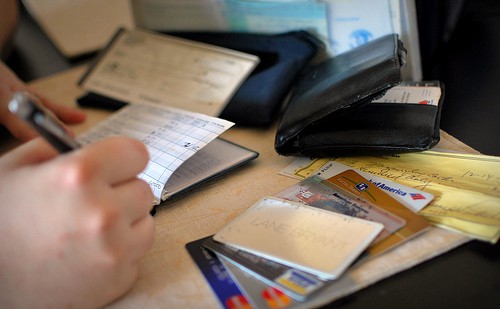
Image of old-fashioned paying the bills by hand with paper checks, credit cards, and an overstuffed wallet. | The-Military-Guide.com

Don’t do this. Put it in autopilot!

It’s a simple proposal: every few days, Digit moves a few dollars from your checking account into your Digit escrow account. For free.

Digit’s algorithms track your income and spending and only transfer a part of the excess balance. They monitor your account balance, upcoming deposits, scheduled bills, and recent spending patterns. Even if your credit-card company sucks their payment out of your checking account without telling your bank, Digit will still note the expense and estimate next month’s payment.

Then Digit sweeps part of the excess to your Digit account– it could be as little as $2 per transfer. They guarantee that you’ll never bounce a check, and if they screw it up then they’ll pay any overdraft fees or late charges. It’s still your money, and you can pull it out of the escrow account any time you want. (Transfers take one business day.) Your “user interface” is SMS texting or Digit’s website, but you can ignore Digit for days or even weeks at a time. You might possibly earn a higher reward from your Digit account than from your bank or credit union.

It’s the perfect financial assistant for busy military Millennials. It works pretty well for us older servicemembers and veterans too. It can be used by anyone with a checking account.

Digit’s a fintech startup, and their financial model depends on signing up as many customers as they can as quickly as possible. They’re still small enough that I can swap a few e-mails with the founder to write this post, and they’re still hiring more staff. They’re going to struggle through the usual challenges of explosive growth and competition. But the company is executing their plan well enough to score nearly $14M of venture-capital financing.

They also have competition. For example, USAA banking customers can use the Savings Coach app to boost savings rates and automatically take a little money out of checking. That’s a very educational app because it gamifies your savings game with challenges and badges. Digit chose a different path with their texting interface that will practically chat with you, but you’ll feel the same warm glow of accomplishment as you text back & forth with Digit’s server. If you’re already using Savings Coach then Digit is a great addition to your financial toolbox.

As a startup, Digit is regulated just like any other financial institution. Your money on deposit with them is insured by the FDIC up to $250K. You can share your Digit account with your spouse or anyone else (just like a joint account) so that they can access it while you’re out of reach. If you decide to move your Digit money to your Roth IRA or another investment account then you can transfer it in a business day.

Digit’s services are perfect for your next deployment. Instead of building up a huge bill-paying buffer in your checking account (earning minimal interest) before you leave, you can let Digit worry about it. Sign up now (months before you deploy) and let Digit’s algorithms learn your earning and spending patterns. By the time you deploy (and leave your bandwidth behind), you’ll have your bills in autopay with your bank service. In between your pay deposits and paying the bills, Digit will cautiously chip away at the excess. When you get back to bandwidth (even if it’s “just” SMS texting), you’ll be able to text for an update on your Digit status more easily than logging into your checking account.

Or don’t bother checking in during the deployment: just let Digit run. Check your Digit balance when you return home and then (here’s the important part) put most of that pile of “found money” into your investments. Sure, treat yourself to a little homecoming party, but don’t feel entitled to blow all that forced savings on yet another consumer purchase. Leverage your deployment deprivation for your financial independence!

Digit is not just for deploying Millennials– it’s also for location-independent workers and perpetual-traveler retirees. I wish this interview had come together before our next 70 days in Spain, but when we return home I’m opening an account. I’ve cut back my financial tracking more than ever before, so in 2016 I’m going to let Digit’s algorithms get used to three credit cards and two mortgage payments. The next time we’re enjoying a slow-travel odyssey (perhaps on a bandwidth-limited cruise ship) I’ll let Digit worry about handling the excess.

How will you use Digit to simplify your financial life? Sign up with the link below, score a little free cash, and share your experience with the readers!

[Mahalo nui loa to J. Money for connecting me to Digit’s founder & CEO for this review! You’ll also see a lot of Digit reviews in the next few months because of their blogger affiliate program. I don’t have a referral account but you can use this link and then text “Refer” to your Digit account to earn your own $5 affiliate fee.]

Related articles:
Top Three New USAA Products And Services
“Start here!”
REVEALED: Our Asset Allocation During Financial Independence

Posted in Money Management & Personal Finance | 2 Comments

Using A Checklist To Format Your Blog Posts


I’m a retired submariner, and submariners live by checklists.

We used a huge checklist for starting up the nuclear reactor, and another huge checklist for shutting it down. We used more checklists for operating the submarine: diving, surfacing, coming to periscope depth, or snorkeling. We used checklists for emergencies: while you were fighting the fire or stopping the flooding, someone was always reviewing the checklist and calling out helpful suggestions. Submariners who couldn’t use checklists didn’t last very long.

We even used checklists for flushing the toilets. (I swear I am not making this up.) You could judge the diligence of your shipmates by whether they correctly used the flushing valves… or by how many times they had to clean up after themselves.

Air Force photo from JOINT BASE PEARL HARBOR-HICKAM (July 24, 2012) Lt. Col. Tom Hudnall and Maj. Andy Meudt, both assigned to the 465th Air Refueling Squadron, Tinker Air Force Base, Okla., conduct a pre-flight checklist on a KC-135 Stratotanker during Rim of the Pacific (RIMPAC) 2012. (Photo by Tech. Sgt. Bradley C. Church/Released.) | The-Military-Guide.com

More complicated than a blog post, but you get the idea.

Yeah, my family still uses checklists today at Hale Nords. (It’s mostly me– you can imagine how enthusiastic my spouse and daughter are about this habit.) But flushing domestic toilets is a lot easier than submarine toilets, so no checklists are posted in our bathrooms.

I used to take a lot of abuse teasing for my checklist philosophy until best-selling author (and surgeon) Atul Gawande published his Checklist Manifesto.

Suddenly hospitals, first responders, businesses, universities, schools, and other teams across the nation began using checklists to make sure that they got things right every time.

This checklist mentality naturally applied to my writing. When I started blogging, I looked everywhere for the checklists. After all, if the Associated Press journalists write their articles with a stylebook, then I wanted to run my blog with a standard format too. But much to my dismay, hundreds of millions of bloggers are somehow blissfully ignorant of the compelling need for checklists.

I kept searching for an answer. I wanted to start each blog post with a framework of the post’s structure. I wanted to use the right HTML in the right places. I also wanted to make sure that I had the images formatted correctly, and that I remembered to add other features to the post, in the same way, every time.

Best of all, I’d be able to quickly format a post and move on to the next project.

I eventually built my own checklist with the help of the WordPress.com help forums. I posted my checklist question, and one of the bloggers suggested that I save a “draft post” file with all of my formatting in the text of the file. When I was ready to format a new post then I’d copy all of the draft post (HTML and text) over to the new post and then start adding my material.

Over the years I’ve learned a lot about formatting a blog post, and I added those tips to my checklist. The list is up to 20 reminders but I can still whip a post into shape in about 20 minutes.

At last year’s FinCon14 workshop, I mentioned this checklist. Much to my surprise, some of the other bloggers in the room were interested. Over the next few months I cleaned up my checklist and then asked Rob Aeschbach at MilitaryFinancialPlanner.com to beta-test it. He came up with some great ideas, which I’ve finally implemented.

Yeah, I know, I’ve finished this year-long project just a few days ahead of the FinCon15 Digital CoLab blogger workshop. Better late than never.

I’ve uploaded the checklist documents into this post, and you can download them using the links below.

How to use your checklist to format a blog post

In the spirit of the book (or in honor of submariners everywhere!), please make the checklist work for you.  Once you have a handle on what I’ve included, then modify your list to suit your stylebook.  My list is 20 steps long, but maybe you’ll go as small as three steps.  As Rob says, “What do you hate to do in a blog post, or forget to do (because you hate it)?”  Use the checklist to get stuff done despite being tired, distracted, or even under duress.  If you don’t write every day, then use the checklist to make sure you remember everything and get it done quickly. Pick the half-dozen steps that really need to happen.  You’ll do the rest of it because you enjoy it, or you might even have a new formatting idea.

All of the text of the checklist is at the bottom of this post, but these three links include extra features for your convenience.

The first link is a text file of the checklist itself.  It’s as low-tech as I can make a file, and it should be compatible with every operating system and word processor.  Copy this into a new draft post on your own site. Here’s the important part: save it as a draft post so that it’s never published! (From now on, you’ll never edit this draft post again– you’ll only copy it and paste it into a brand-new blank post.) When you’re ready to format a new post, then copy this checklist over to a brand-new post and begin plugging through the 20 steps.

The checklist includes some very simple HTML (mainly for links in the post). If you’re new at this, don’t worry about screwing it up. You’ll figure it out by comparing your checklist post to the original text file, and then you’ll edit your checklist post.

Once you’re comfortable with my version of the checklist, edit it to make it your checklist.  Delete the steps you don’t care about, add your own, or just use it as a reminder of the little things that you need to remember for each and every post.  Save it as a draft.  When you’re ready to format your post, then copy your draft text into a brand-new post.

The second link is the same checklist with a more detailed explanation of each step.  This post would be three times longer if I explained each feature in the checklist.  I read dozens of blogs every week, and I take notes of neat ideas or nasty pitfalls.  I don’t remember all the places I’ve learned these techniques over the years, but I try to explain the rationale behind each step.  This list gives you the background and a detailed explanation for each step.

Use this document to add your own enhancements to the checklist. It’s also another backup copy of the checklist if you accidentally edit the original on your blog (instead of copying and pasting).

The third link is a PDF for you to save and archive.  It’s deliberately hard to edit because it’s the copy you’ll refer to if you accidentally screw up your version.  It opens and closes faster, and it’s easier to refer to for side-by-side comparison.

I strongly recommend that you save these documents to your hard drive and to your online backup drive. When you modify them, I’d recommend backing them up all over again. If you’re truly paranoid experienced with data storage then you might also want to print out a copy. (I don’t want to get into how I learned this.) If you someday have your own “learning” experience, then at least you’ll have everything you need to reconstruct your checklist. Otherwise, you’ll have to hunt down this post again and restart from my original version.

By the way, I wrote this checklist when WordPress 4.3 was the latest version. If you’re using this with a later version of WordPress then some of the names or features might be out of date.

Over the last five years, I’ve learned that WordPress doesn’t work the same way on every browser and every theme. There are some features that don’t work reliably.

If I do something in a certain way and you’ve found a faster or easier way to do the same thing, then use your way. It probably works better on your system, and you can always check by saving the draft post and then previewing it.

Please let me know if something in this checklist doesn’t make sense– or if it doesn’t work! My setup might be different or my guidance could have more than one interpretation. We’ll figure it out and I’ll publish an update.

Blog post checklist text file (This link downloads a low-tech text file of the checklist without explanations.)

Blog post checklist with explanations   (This link downloads a robust Word file of the checklist, including explanations.)

Blog post checklist with explanations  (This PDF is your last-ditch hardcopy backup, including explanations.  Download & archive.)

The blog post checklist:

1. From the “Posts” view of your WordPress control panel, select “Edit” on the title of your checklist post draft.

  • – Switch the WordPress view of this checklist to “HTML” or “Text” (so that you can copy HTML and codes as well as text).
  • – Select all of this checklist text and copy it.
  • – Select “Add New Post” from the WordPress sidebar.
  • – Paste the entire checklist text to your fresh draft of a new post.
  • – Switch the WordPress view of this new post back to “Visual” (if you prefer to work from this view).

2. Before you add any of the new post’s text above this checklist:

  • – Compose your post as a document on a word-processing program.
  • – Add in bold, italics, and underlining with your word processor. (Or add this when you format the post in WordPress.)
  • – The first paragraph could include the phrases “financial independence” or “military retirement”.
  • – Insert the post’s link URLs in the document’s anchor text.
  • – Add links for “Related posts”: copy their titles (anchor text) and URLs at the end of the document.

3. Copy and paste the text of your word-processor document in the WordPress editing window above the top of this checklist. Add a few blank lines to make sure you separate your new post from this checklist text.

4. Format the post text with bold, italics, and underlining. It might have been stripped out by the WordPress cut & paste. Save the post as a draft and then preview the result to check the text formatting.

5. Format all of the link anchor text (including related links) with color code #bb133e.

  • – Select “Text color” and click on “Custom” at the bottom of the color palette.
  • – Edit the “#” field with the code for your chosen color. (For example, “bb133e”.)
  • – Click “OK”.
  • – Highlight your chosen anchor text.
  • – Click on “Text color” and click on the new custom color box at the bottom of the palette.

6. Sending readers to the top (if the theme doesn’t already do so):

  • – Switch the WordPress view of this checklist to “HTML” or “Text”.
  • – At the beginning of the post or page, add this HTML: <a id=”top”></a>
  • – Anywhere in the post that you want a link to return the reader back to the top of the post, add this HTML: <a href=”#top”>(Click here to return to the top of the post.)</a>

7. Add images from your preferred stock photo website:

– Give your image a descriptive filename like “Chocolate-Chip-Cookies.jpg” and save to your drive. Make sure the filename of this image is different from the permalink URL of your post or WordPress will only display the image.

8. Insert your image(s) into your post:

  • – Put your cursor in the post text where you want to add the image.
  • – Select “Add Media” from the post editing screen and upload the file.
  • – Choose simple display settings from “Attachment Details” like “Alignment” (Right), “Link to” (Media file), and “Size” (Medium). You can edit the rest of the attachment details from here (WordPress doesn’t always save the information from this screen) or from the image in the post.
  • – Click “Insert into post”.

9. Edit your image for descriptions, SEO, and a faster display time:

  • – Click on the image and select the “edit” icon.
  • – Add a short caption (this will display under the image in the post).
  • – Alt text: A description of the image for visually-impaired readers (and search engine indexing bots). Describe the image but feel free to stuff keywords in this text.
  • – Add “| The-Military-Guide.com” to the end of the alt text (the URL is used by Pinterest).
  • – Check display settings one last time.
  • – If your image will be linked to another URL, change “Link to” to “Custom URL” and enter the URL. Otherwise leave the “Link to” setting as “Media File” for viewing a larger version of the image.
  • – Add metatext in the “Image Title Attribute” field. This text displays when the reader’s cursor hovers over the image. Use it for additional commentary or SEO.
  • – Click “Update”.

10. Check the “img” HTML for correct alt, src, and size attributes:

  • – Switch your post editing view to “HTML” or “Text” and find the image’s HTML. It might start with “img” or “caption”.
  • – alt= description of photo for SEO bots| The-Military-Guide.com.
  • – src= The-Military-Guide.com/wp-content/uploads/2014/01/chocolate-chip-cookies.jpg.
  • – width=”595″ height=”770″ (insert exactly what dimensions you want so it loads faster).
  • – Switch the WordPress view back to “Visual” (if you prefer to work from this view).

11. HTML tables:

12. Break up a long post using h3 headers with SEO keywords.

13. Guest posts:

  • – Add to the beginning of the post:
  • “This post is brought to you by… ”
    “If you’re interested in contributing at The-Military-Guide.com, please see our posting guidelines (sample:  https://the-military-guide.com/guest-posts/).”
  • – Add bio of guest poster to end of the post?
  • – Use red color #bb133e and italics font.
  • – If applicable, use the “Custom Author Byline” boxes to insert your post author’s name and site.

14. Schedule the date and time for the post to go live.

15. Build a Twitter tweet and add hashtags:

  • – If the shortlink is not in the Twitter window of the Publicize plugin, then “Save Draft”. Click on “Get Shortlink” from the Permalink line under the post title. Copy & paste that into the Twitter window.
  • – Limit the use of hashtags to a total tweet length of about 125 characters for easy retweets: #military #sot #MilitaryLife #vets #milfam #militaryretirement #earlyretirement #milspouse @USAA @MOAA #milSO.

16. Choose the category of the post.

17. Add tags to the post:

– early retirement, military, military retirement, financial independence.

18. Featured image:

  • Add an image of a book cover or some other photo. Consider editing it for Pinterest as well.
  • A 640×400 pixel size (or 708×400) may be specified for some themes.

6a. Add the HTML code at the bottom of the post for returning to the top of the post (if the theme doesn’t already do this):

<span style=”color: #bb133e;”>bb133e;” href=”#top”>(Click here to return to the top of the post.)

19. Add the WordPress shortcode at the end of post text (before the “Related articles”) for displaying a book ad or some other product ad:

wpsm_woobox id=”10370″   (This shortcode would actually be surrounded with brackets, but then you’d see a book ad.)

20. Related articles:

– Move the related article anchor text and URLs to a couple lines after the book ad.

Related articles:
Start Your Blog– Or Outsource It!
Just Write It
Update To “Just Write It”
Beginner’s Guide To Part-Time Blogging For Money
Beginner’s Guide To Part-Time Blogging For Money (part 2 of 2)
“So Nords, why are you still blogging?”
“So Nords, why are you still blogging?” (Part 2)
“So Nords, why are you still blogging?” (Part 3 of 3)
Details Of The Blog Move
The Checklist Manifesto:  How To Get Things Right
Creating and promoting the perfect blog post (courtesy of Chris Ducker, two weeks after I drafted this post)

Posted in Entrepreneurship | 2 Comments

Top Three New USAA Products And Services


It’s been a while since my last post about USAA, and they’ve churned out several new products. Individually they’re impressive enough, and collectively they’re making life easier for members.

Before I dig into that, the Federal Trade Commission wants me to disclose that I have a business relationship with USAA. My spouse and I have used their auto insurance since 1981 (and we recently filed a claim on a hit&run driver). Our daughter joined USAA a few years ago when she bought her first vehicle, and my father has some of his assets in their CDs. (Dad is a 1950s Army draftee, and I signed him up in 2012.) I’ve also been to USAA’s headquarters for three different conferences where they paid for our lodging & food. And last but definitely not least, USAA advertises on this blog. The advertising revenue raises the blog’s value so that I could sell it to the current owner for a very large donation to military-friendly charities.

Let me get right down to USAA’s long-term goals:

  • The company wants more members (“All who served honorably, and their families”), and
  • They want to keep their members after their military service.

It’s been nearly 20 years since they expanded their membership eligibility, and the data is conclusive: the newer members are buying more products and services while costing less to take care of. (Some of that is age-related, and technology has given a big boost to member service.) USAA is spending less of our premiums on direct marketing and gaining more paying members through partnerships like the NFL Salute To Service and Hiring Our Heroes. The company is stumbling badly in some areas (business checking) but racking up impressive numbers in others (claims processing, member financial readiness).

I noticed an interesting data point the other week. My spouse and I only carry liability insurance on our vehicles (no collision or comprehensive) and we’ve lived at the same address for 15 years. Unlike USAA’s active-duty members, our driving habits have been relatively constant since we’ve retired. During those 13 years (including a teen driver), our monthly premium has risen from $69.67 to… $70.28. It bounced around in the high $70s for a few months, but overall it’s been remarkably flat for more than a decade. Meanwhile, inflation has risen by 33% over the last 13 years, or an average of 2.2% per year. USAA’s core business– insurance– has held the line on price hikes.

Of course, I’ve paid enough premiums during those years to buy a good used car– yet the point of insurance is protecting yourself against catastrophic risks that could destroy your financial independence. I sure hope I waste several more decades of premiums.

But that’s just one data point for one member. If you’ve had the same policy and coverage for over a decade then I’d love to hear how your premiums have changed.

Let’s move on to USAA’s new products.

Savings Coach

Image of the USAA app Savings Coach game for members to complete challenges and earn medals | The-Military-Guide.com

First challenge coming up…

USAA is blatantly pandering to Millennials with a smartphone app that gamifies savings! As silly as it sounds, it works with geezer members too.

This app has been in their Innovation Center for a while, and I saw a beta last fall. They released Savings Coach a couple months ago and it’s free for any member with USAA savings and checking accounts.

In financial terms, it’s designed to monitor the changing balance in your checking account and then suggest places where you could save a little more money.

In gamer terms, the USAA eagle challenges you to cut your expenses and take your savings to the next level for valuable prizes, er, medals.

Last month I opened my first-ever USAA checking and savings accounts. It took about 10 minutes on their website and a few days later I was ready to go. I’d already downloaded the USAA Savings Coach app (it’s also in Android’s Google Play), and the first thing the eagle wanted me to do was the “Pay Yourself First” challenge. We decided that I could afford to transfer $10 every week from checking to savings, and the app set up the automated transfer.

Image of USAA's Savings Coach game challenges screen with coffee challenge, pizza challenge, and build your own challenge | The-Military-Guide.com

… and build your own.

Next up are the “Coffee Challenge” and the “Pizza Challenge”. You can also build your own challenge by deciding what treat you’re going to skip once in a while to put the savings in your… savings account. Complete your challenges and earn a medal. Your dashboard shows yesterday’s total spending and your average spending, and you can also check your medal count.

Change your daily habits by putting the Savings Coach icon in the space currently occupied by your favorite smartphone game. Play around with the challenges. Gamify your net worth by earning medals. Nobody else has to know what you’re doing– it’s just between you and the app.

You may feel a little goofy about working with an animated eagle, but meanwhile, the app is helping you track your spending and figure out where you’re wasting money. In your spare time, you’re gradually moving money from your checking account (that you’d be tempted to spend) to savings (earning higher interest) and then you can invest it for your financial independence.

How does raising your net worth compare to your latest favorite smartphone game?

Financial Readiness Score

Next up is the Financial Readiness Score. (Sorry, no more animated characters.) It’s a classic financial-planning tool with data boxes for you to fill in your numbers. Depending on how well you already know your financial picture, it takes about 15 minutes to complete the initial data entry.

It pre-fills the screens from your profile, and you can link non-USAA accounts for a consolidated view of your finances. (“Link” means that USAA can log on to your other financial accounts to query the balances, but they can’t touch anything.) The tool quickly populated its spreadsheet with my accounts from Navy Federal Credit Union, Pentagon Federal Credit Union, Fidelity, American Express, Bank of America, and Chase. (It already knew about my USAA accounts.) It can even link to your Thrift Savings Plan account.

In the next few steps, you add information about your household budget and spending. It’s not as detailed as their retirement planner but it looks at how much of your spending is discretionary or debt payments. It also checks your retirement savings by tapping into your USAA retirement planner (if you’ve filled one out) and your other linked accounts.

Another step asks Yes/No questions about your insurance policies, your financial plan, your will, and your healthcare directive.

Then you click on the results button.

Your total score is broken down among those four areas. The heaviest weighting (43%) is having enough insurance (after all, USAA is an insurance company). I only got 28/43 in this section because my spouse and I don’t carry life insurance (a subject for another post) and we have minimal car insurance. I had 24/24 points for savings & retirement. (Whew!) I also scored 13/13 on our financial plan and our legal documents. I squeaked by on the household finances (16/20) because I need to update our budget in the retirement planner.

Best of all, this is not just a feel-good checkup. At the end of the process, you have an action list. You can add the FRS tile to your default “Account View” login page and see it every time you use the site.

In a future post, I’ll do a deeper dive on the FRS and report my progress.

“My Credit Score”

Finally! A credit score without having to jump through hoops!

USAA has rolled out their credit-scoring service over the last few months, so if you’re a member then you may already have seen that tile pop up on your accounts summary page. If you don’t see the tile then go to their “Credit and Identity Monitoring Tools” and sign up for Experian’s free CreditCheck service. (Don’t get suckered into the paid services– “free” is good enough.) It’ll ask you a few questions to confirm your identity (including your Social Security number) and then the tile should pop up in your accounts window.

You need to be a USAA member to sign up for this service, but you don’t need a USAA credit card.

Experian’s CreditCheck VantageScore is different than the FICO score, but it’s the same scale and your credit scores would be within a few points of each other.

The real value of the credit-scoring service is pointing out where you may be helping or hurting your own credit. My score is apparently a few points lower than it could be due to:

  • “Lack of sufficient credit history on bankcard or revolving accounts”
  • “Open real estate account balances are too high compared to their original loan amounts”
  • Very few loans
  • Too many inquiries

In other words, I tend to close credit-card accounts that I’m not using (especially when their terms change or I encounter bad customer service) and I’m making the minimum payments on my mortgages. I apparently need to have more credit cards (three is “very few”?!?) but I don’t know who’s making the “too many” inquiries.

The algorithm says that my credit score dropped a few points for each issue.

You’ll see what’s affecting your credit score, and you’ll learn how to improve it. This not only affects the amount of money you can borrow and the lender’s interest rate, but it will also affect your insurance premiums and your ability to rent an apartment or a home. Even better, Experian’s system predicts how much you’d be able to improve your score. A few points might be enough to move you from one borrowing category to another and save you a lot of money on interest rates.

My score is what I expected to see: it’s in Experian’s top “Super prime” category, and a lot higher than the Hawaii state average of 689. (Not that I’m hyper-competitive about it.) I could raise my score by opening a few more credit cards (earning tens of thousands of free frequent flyer miles) but I feel that my financial life is already complicated enough. However, I’m going to keep an eye on mortgage rates, because knocking another half-percent off our current interest rates would free up quite a bit more cash.

Experian’s free service also offers a free annual credit report, so that’s one less time you’ll have to visit AnnualCreditReport.com.

A traditional product: member service

Image of 2005 Prius car with collision damage from pickup truck hit&run driver | The-Military-Guide.com

The hit&run destroyed the hatchback latch, too.

Speaking of USAA member services, a couple of months ago our 10-year-old car was rear-ended by a hit&run driver. (Nobody was injured and we’re fine.) We reported the other vehicle’s license plate number to the police to confirm that we’re not at fault for anyone else’s damage.

It cost us $500 of hardware to get the car back on the road. (The cosmetic dents could easily cost another $2000 to hammer out, but we’re not fixing those.) We haven’t carried collision insurance in over 30 years, so we’ve saved more than enough money to pay for a busted hatch latch and a bumper mount. I was very impressed by the USAA mobile app– I was able to notify them of the accident in less than 10 minutes, including iPad photos and a collision diagram. I strongly recommend downloading their mobile app on your smartphone or tablet. I hope you never need to use the claims feature, but if you’re stuck on the side of the road then you’ll probably be able to submit your claim before the tow truck shows up.

I’m returning to USAA next month for DigitalMilEx. If you have questions about the products and services described in this post, I can get the answers directly from the program managers. If you have questions about anything else at USAA, I can research those answers too.

Related articles:
Savings Coach (Apple Store) (Google Play)
USAA’s Retirement Planner And Financial Goal-Planning Tools
Hiring Our Heroes: Teaching Employers To Hire Military Veterans And Spouses
DigitalMilEx schedule, topics, and speakers

Posted in USAA | 2 Comments